
Screenshots



App details
- Version
- 7.1
- Size
- 81.88 MB
- Updated
- March 9, 2017
- Requires
- Windows 2003
- Language
- English
- License
- Trial version
- Developer
- Cadopolis
- Category
- Windows OS
SoftPas in:
This product is also available in the following languages:
About AcroPlot PDF
Download AcroPlot PDF – Convert DWG to PDF, Free Trial, Secure Windows Tool
Overview of AcroPlot PDF
AcroPlot PDF, developed by Cadopolis, is a lightweight Windows utility designed specifically for converting AutoCAD DWG files into high‑quality PDF documents. Although it is offered as a trial version, the program packs a surprisingly robust feature set into a modest installation footprint, making it a popular choice among architects, engineers, and designers across North America. Since its inclusion in our catalog in 2011, AcroPlot PDF has accumulated over 46,000 downloads, reflecting steady demand in both professional and educational environments. The current version, 7.1, was last updated on June 15 2011 and continues to run smoothly on legacy systems such as Windows 2000 and earlier releases. With its intuitive interface, fast conversion engine, and secure handling of proprietary CAD data, AcroPlot PDF stands out as a reliable bridge between the CAD world and the universally accepted PDF format.
Key Features & Benefits
- Fast DWG‑to‑PDF conversion: Transforms complex 2D and 3D drawings into crisp, printable PDFs in seconds.
- Batch processing support: Allows users to queue multiple DWG files for simultaneous conversion, saving valuable time on large projects.
- Customizable page settings: Choose paper size, orientation, scaling, and lineweight preservation to match project specifications.
- Embedded fonts and vector graphics: Ensures that the resulting PDF retains exact geometry and text fidelity without rasterization.
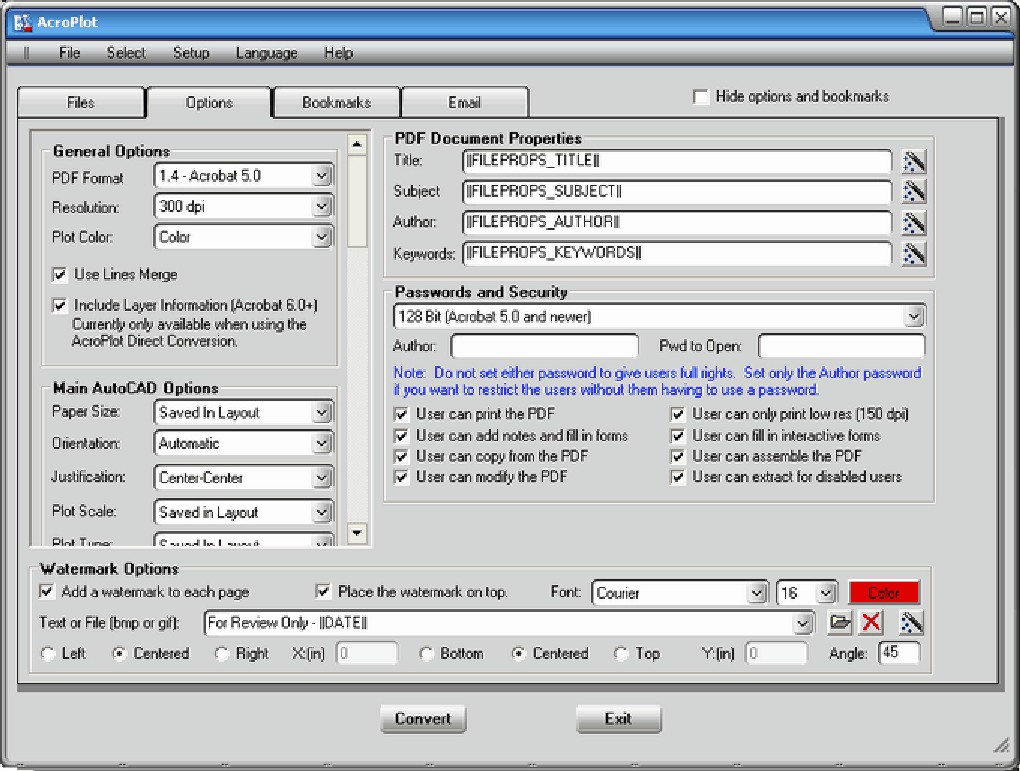
- Security options: Apply password protection and set permissions to restrict editing or printing of the exported PDF.
- Low system footprint: The installer occupies less disk space than most design‑software utilities, making it ideal for older machines.
- Multi‑language support: The interface is available in English, with plans for additional languages in future releases.
- Free trial with full feature access: Test the complete functionality before deciding on a purchase.
These features collectively address the most common pain points encountered when sharing CAD drawings with clients, contractors, or regulatory bodies that may not have AutoCAD installed. By converting DWG files to PDF, AcroPlot PDF eliminates version‑compatibility issues, reduces file size, and ensures that visual information remains unaltered across different platforms. Moreover, the batch processing capability aligns perfectly with the workflow of firms handling dozens of drawings per project, allowing them to generate a complete PDF set with a single click.
Installation Guide & System Compatibility
Step‑by‑Step Installation
- Download the AcroPlot PDF trial installer from the official Cadopolis website or our trusted download portal.
- Locate the downloaded
.exefile and double‑click to launch the setup wizard. - Follow the on‑screen prompts: accept the End‑User License Agreement, choose an installation folder (the default path works for most users), and click “Install”.
- When the progress bar reaches 100 %, click “Finish”. The program will launch automatically, presenting a clean welcome screen.
- Enter your trial registration key (provided in the confirmation email) to unlock the full feature set for the trial period.
The entire process typically takes under two minutes on a standard desktop computer. Because AcroPlot PDF is built on native Windows APIs, it does not require additional runtimes such as .NET Framework or Java, further simplifying deployment in restricted IT environments.
Supported Operating Systems
AcroPlot PDF is officially supported on the following Windows platforms:
- Windows 2000 (SP4 and later)
- Windows XP
- Windows Vista
- Windows 7
- Windows 8 / 8.1
- Windows 10 (32‑bit and 64‑bit)
While the software was originally targeted at legacy systems, it runs without issues on modern Windows releases, making it a versatile choice for both older workstations and newer laptops. Users should ensure that they have at least 200 MB of free disk space and a minimum of 512 MB RAM for optimal performance. No additional plug‑ins or third‑party libraries are required.
Pros and Cons of AcroPlot PDF
Advantages
- Lightning‑fast conversion speed, even for large, complex DWG files.
- Batch conversion streamlines high‑volume workflows.
- Preserves vector data and lineweights, resulting in professional‑grade PDFs.
- Low installation size makes it suitable for older PCs.
- Free trial provides full access to all features.
- Built‑in security options protect confidential drawings.
Drawbacks
- Only available for Windows; no native macOS, Linux, or mobile versions.
- Trial version limits usage time; a full license requires purchase.
- Interface, while functional, feels dated compared to contemporary cloud‑based converters.
- No direct integration with cloud storage services (e.g., OneDrive, Google Drive).
- Updates have not been released since 2011, raising concerns about long‑term support.
Overall, AcroPlot PDF delivers a focused, efficient solution for DWG‑to‑PDF conversion. Its speed and batch capabilities outweigh the modest UI and lack of cross‑platform support, earning it a solid four‑star rating for professionals who primarily work on Windows.
Frequently Asked Questions
Can AcroPlot PDF handle 3‑D DWG files?
Yes. The converter extracts 2‑D viewports from 3‑D DWG models and renders them as vector graphics in the PDF, preserving depth cues and lineweights.
Is there a limit to the number of files I can convert in one batch?
The software does not enforce a hard limit, but performance may degrade if you queue several hundred large files at once. For best results, split very large batches into groups of 50‑100 files.
How does the trial version differ from the full license?
The trial version provides unrestricted access to all features for a 30‑day period. After the trial expires, you must purchase a license to continue using the software without interruption.
Can I add watermarks or custom logos to the exported PDFs?
AcroPlot PDF includes a basic watermarking tool that lets you overlay text or an image onto each page of the PDF during conversion.
Is technical support available for the trial version?
Yes. Cadopolis offers email support for all registered trial users, with typical response times under 24 hours.
Conclusion & Call to Action
If you need a fast, reliable way to turn AutoCAD DWG drawings into universally shareable PDFs without sacrificing quality, AcroPlot PDF remains one of the most practical Windows‑only options on the market. Its batch processing, security features, and minimal system demands make it especially valuable for firms still operating on legacy hardware. While the lack of recent updates and cross‑platform support are legitimate concerns, the core conversion engine has proven stable for over a decade. For professionals who prioritize speed and precision over cloud integration, the free trial is an excellent way to evaluate whether AcroPlot PDF fits into your design workflow. Download AcroPlot PDF today, test the full feature set, and experience hassle‑free DWG‑to‑PDF conversion for your next project.
Guides & Tutorials
How to install AcroPlot PDF
- Click the Download button above.
- Once redirected, accept the terms and click Install.
- Wait for the AcroPlot PDF download to finish on your device.
How to use AcroPlot PDF
This software is primarily used for its core features described above. Open the app after installation to explore its capabilities.
User Reviews
No reviews yet. Be the first to share your experience.
You may also like
more
Llama 2
Free-to-use large language model As the new addition to Meta’s arsenal of langua...

NotebookLM
Revolutionizing the note-taking and idea-generation process NotebookLM is an exp...

Github co pilot
AI-inspired software development and coding platform GitHub Copilot is a browser...

Google Gemma
Google’s lightweight AI models Introducing Google Gemma , a family of cutting-ed...

AI Image Enlarger
A free app for Windows, by ai-image-larger. AI Image Enlarger is a free software...

DALL E
AI-driven text-to-image transformation engine DALL·E is a free graphic and desig...